
USER GUIDE
User Guide – How to Check and Download FESCO Bill Online
This user guide will help you understand how to check, view, download, and print your FESCO online bill easily. Our platform allows consumers to quickly access their latest electricity bill by using a 14-digit reference number or consumer ID. Once the bill appears on your screen, you can view details, download the bill in PDF format, or print it for payment.
How to Check FESCO Bill Online
Checking FESCO electricity bill online is very easy. Just follow these steps.
Step1:
Open fesco.pk
First, visit the FESCO bill checking page on our website fesco.pk.
Step2:
Enter Reference Number
Enter your 14-digit reference number or 10-digit consumer ID in the input field.
Step3:
View Your Bill Details
Your FESCO online bill will appear on the screen with complete information.
Step4:
Download or Print the Bill
You can download the duplicate FESCO bill as a PDF or print it directly for payment or record keeping.
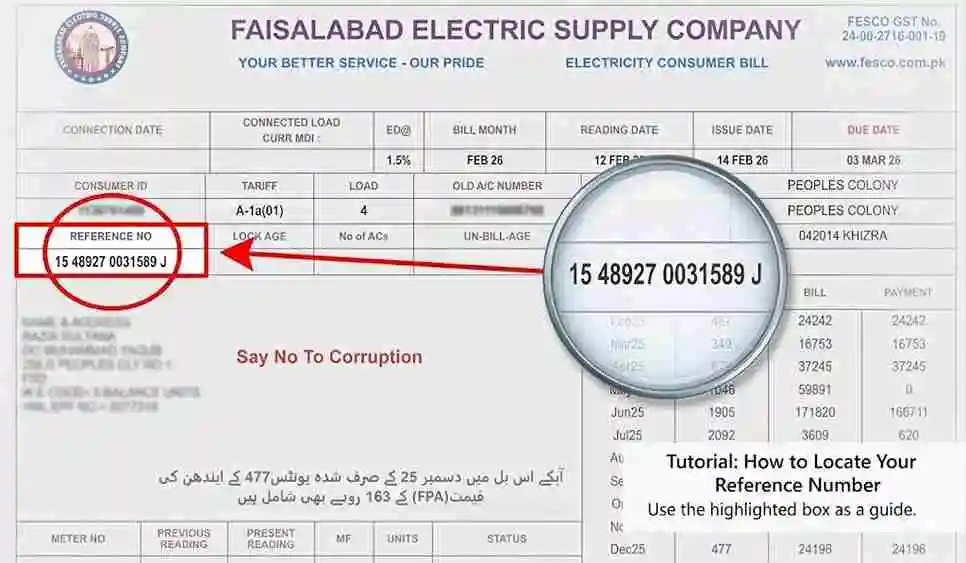
How to Find the FESCO Reference Number
The reference number is required to check FESCO bill online.
You can find it on your previous electricity bill:
Without this reference number, it is not possible to check your electricity bill online.
Information Available in Your FESCO Bill
When you check your FESCO online bill, you will see detailed billing information including:
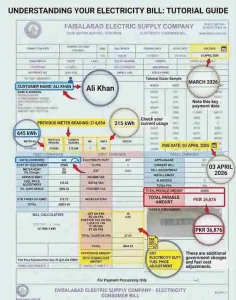
This information helps consumers understand their electricity usage and manage their monthly expenses.
Benefits of Checking FESCO Bill Online
Checking your FESCO electricity bill online offers several advantages
Instant Access
You can check your bill anytime without waiting for the paper bill to arrive.
Free Service
Online bill checking is completely free and does not require registration.
Download and Print Option
Users can download the bill as a PDF or print it for payment purposes.
Easy Record Keeping
You can save previous bills on your device for future reference.
Avoid Late Payments
Checking your bill online helps you know the due date and avoid late payment surcharges.